¶ Tournament Settings
Every field on the Create Tournament form, explained. Most of them you can leave alone: Bridge Champ fills in sensible values and you only need a title, a description and a start time. This page is for the day you want to change one and are not sure what it does.
📋 At a glance
What it is: A reference for the tournament setup form.
Who it is for: Anyone creating a tournament, from a club night to a one off event.
You will need: Nothing. Read it beside the form.
¶ How the form is organised
The form has five sections. Main is open when the form appears and holds everything you must fill in. The other four start closed, and you only open them if you need them.
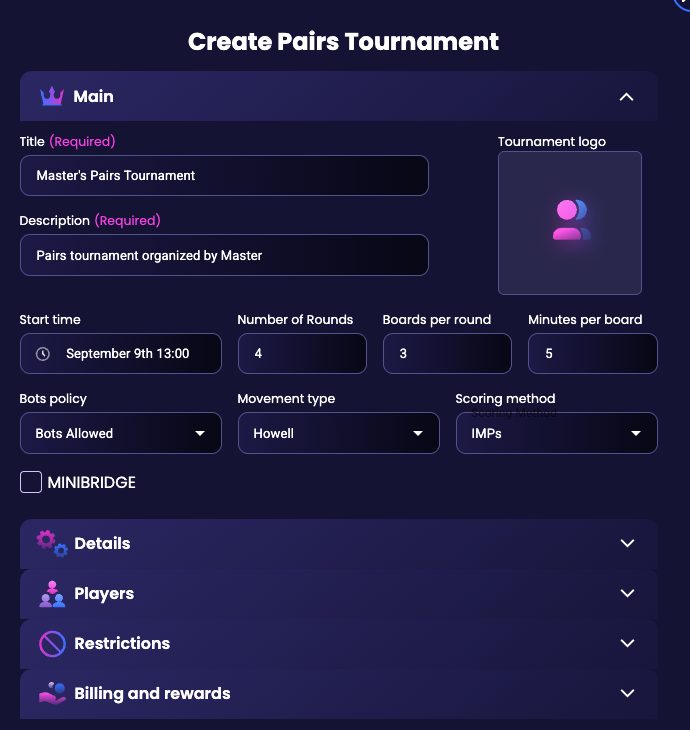
¶ Main
The only two fields marked Required are the title and the description.
- Title: The name your players will see in the tournament list.
- Description: A line or two about the event. Worth writing properly: it is what people read before deciding to enter.
- Tournament logo: An optional picture for the tournament card.
- Start time: The date and time play begins.
- Number of Rounds: How many rounds the event runs. Four to start with.
- Boards per round: How many boards in each round. Three to start with.
- Minutes per board: How long players get for each board. Five to start with, so a three board round lasts about a quarter of an hour.
- Bots policy: Whether robots may take part. The tournament list can be filtered on this, so players can look for events with no bots.
- Movement type: How pairs move between tables. Howell to start with.
- Scoring method: How the results are worked out: MPs, IMPs, BAM or Patton.
- MINIBRIDGE: Turns the event into Minibridge, the simplified game with no auction.
Multi-session tournaments. If you organise a multi-session tournament, the form offers to attach the new tournament to it as its next session. Only the organiser can add sessions, and with several sessions the title has to stay short. For a club, you need to be a club admin to create one.
¶ Details
This is the long section, and the one worth knowing. Four of its settings are already switched on or off for you.
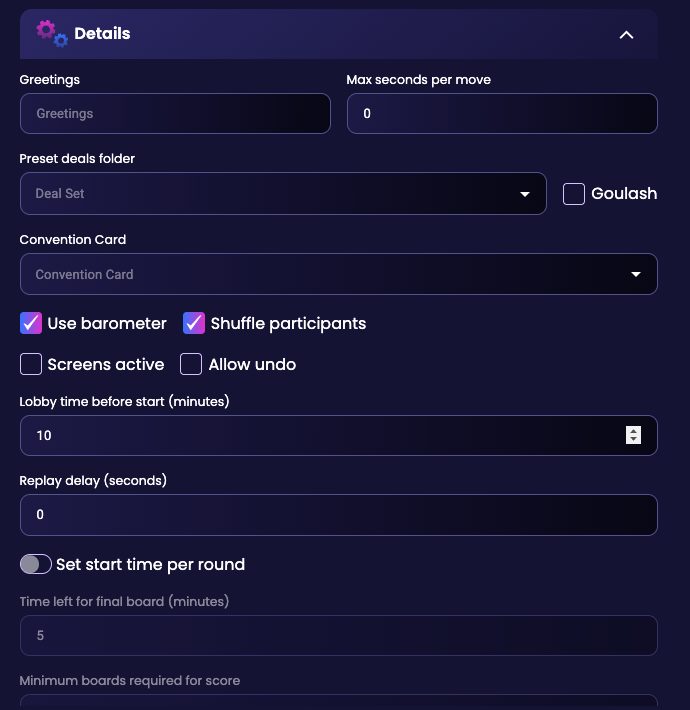
- Greetings: A short message shown to your players.
- Max seconds per move: A time limit on each single card or bid. Set to 0 to begin with.
- Preset deals folder: Play a set of hands you prepared yourself instead of random ones. Pick one of your deal sets here. See Deal Source. If some boards in the set have saved positions (see Play From Position), Bridge Champ asks whether to play every board All from the start or From saved positions. When a board has several saved positions, you choose the one it starts from, with a preview of the hands. Vugraph events created from a deal set work the same way.
- Goulash: Deals the hands in packets rather than one card at a time, which produces much wilder distributions. A change of scene for a club night, not for a serious event.
- Convention Card: Attach a convention card to the tournament. See Convention Card.
- Use barometer: Shows the running score while play is still going on, so everyone can see where they stand. Ticked by default.
- Shuffle participants: Mixes up who plays whom rather than seating people in the order they registered. Ticked by default.
- Screens active: Turns on virtual screens, which stop partners seeing each other during the auction.
- Allow undo: Lets players take a card or a bid back.
- Lobby time before start (minutes): How early players can gather before play begins. Ten minutes by default.
- Replay delay (seconds): A delay before hands can be replayed.
- Set start time per round: Give each round its own start time instead of letting them follow on.
- Time left for final board (minutes): How much time is protected for the last board of a round.
- Minimum boards required for score: How many boards someone must play before they get a result at all.
¶ Players
- Max number of players: The cap on entries. One hundred by default.
- Include players: Name specific players to let in.
- Exclude players: Name specific players to keep out.
¶ Restrictions
This is where you decide who is allowed to enter. If you are running an event for your club, Club Tournaments walks through this section with screenshots.
- Club: Attach the tournament to one of your clubs. Choosing a club also brings up a field for restricting the event to particular classes.
- Minimal player completion rate %: Keeps out players who tend to abandon events before the end, below the percentage you set.
- Days since registration: Keeps out brand new accounts, by the number of days you set.
- Minimal Player Ranking: Sets a floor on the rating needed to enter.
- Only club members: Limits entry to members of the club you chose.
- Password protected: Gives the tournament a password instead. See Password Protected Tournaments.
¶ Billing and rewards
- Billing: How the event is paid for.
- Registration Fee: What each player pays to enter. Zero by default, which makes the tournament free.
- Creator Commission %: Your share of the entry fees. Ten percent by default.
- ACBL sanctioned (Bots tournaments only): a play-with-bots event that awards ACBL masterpoints. Undo and the suit split are not available to its players, and the registration fee is set by its number of boards: 225 credits under 18 boards, 425 credits from 18 boards. Players only receive the points if their ACBL number is linked, verified and in the ACBL roster. If you do not see this option, your account is not set up to run sanctioned events; write to info@bridgechamp.com.
¶ What changes with the tournament type
The form is almost the same whichever type you pick, with two differences worth knowing:
- Bots tournaments have a Finish time instead of Minutes per board, and no Set start time per round. They run as an open window rather than to a clock.
- Teams tournaments have no Include players or Exclude players, because you are admitting teams rather than individuals.
¶ Related guides
- Create Tournament: the walkthrough, with video
- Recurring Tournaments: repeat one automatically
- Manage Tournament: run it on the day
- Club Tournaments: reserve an event for your members
- For Tournament Directors: all director guides

Not sure about a setting? Write to us at info@bridgechamp.com.