¶ Deal Source
Deal Source is where you keep your bridge hands. Hands live in folders called Deal Sets, so you can organise them by topic, by lesson, or by class. From here you can create hands, import them from a file, print them, and load them onto a table for your students.
📋 At a glance
What it is: A library of your hands, organised in folders.
Who it is for: Any teacher who prepares hands in advance.
You will need: A Bridge Champ account.
¶ Overview
Think of Deal Source as your filing cabinet of teaching hands. Build a set once (a finesse set, a set of slam hands, next week’s class) and reuse it whenever you like.
📝 Note: Bridge Champ uses the words hand, deal and board for the same thing: one set of 52 cards dealt to the four players. This guide says ‘hand’.
¶ Why teachers use it
- All your teaching hands in one place, grouped in folders.
- Reuse a set every term instead of preparing hands again.
- One click to print a set as a handout, or to load it onto a teaching table.
¶ How to use it
¶ Step 1: Open Deal Source
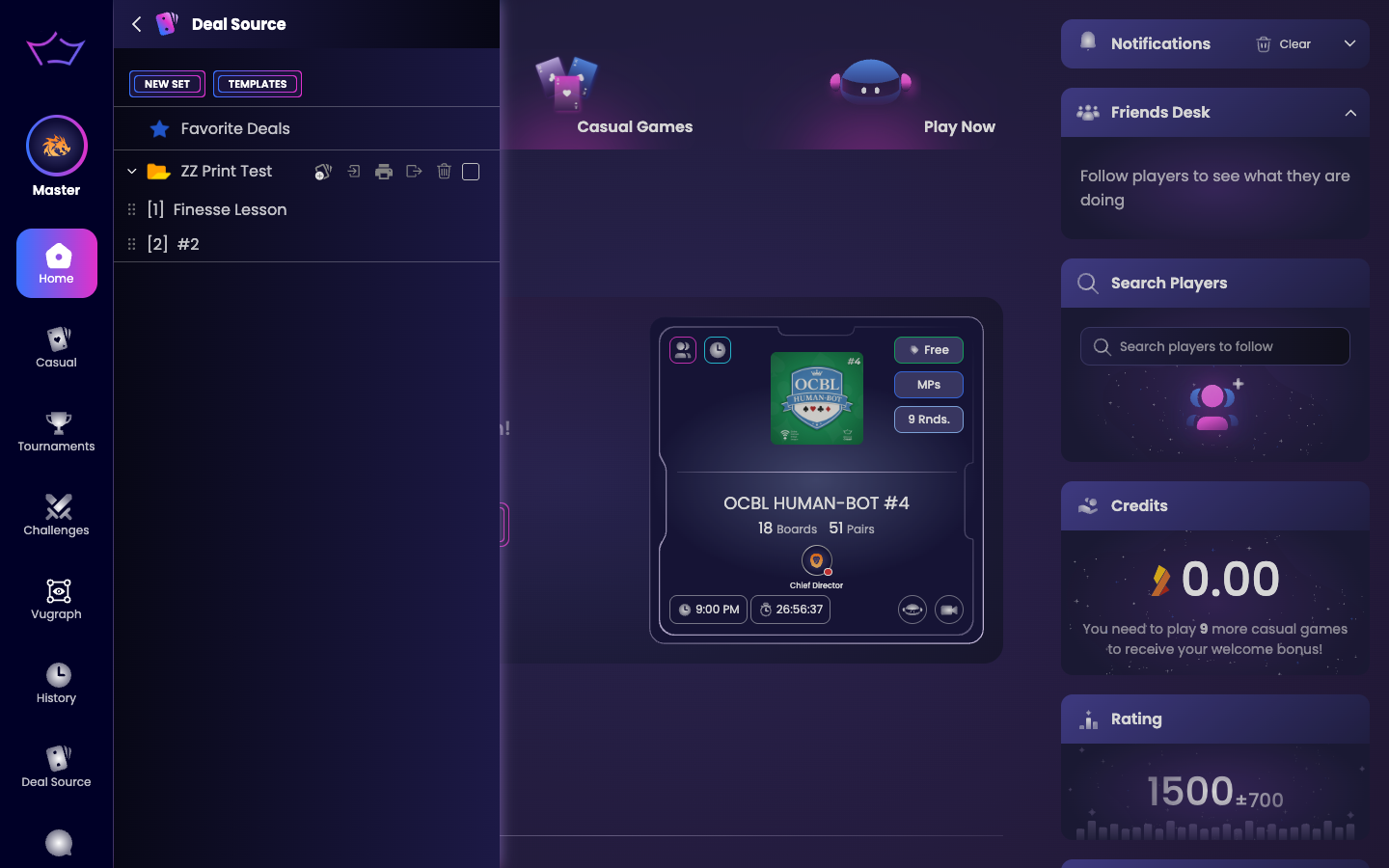
Click Deal Source in the left menu. You will see your folders, starting with Favorite Deals, and the NEW SET and TEMPLATES buttons at the top.
¶ Step 2: Create a Deal Set (folder)
Click NEW SET and give the folder a clear name, such as “Weak Two Openings”. It appears just below Favorite Deals.
¶ Step 3: Add hands to the folder
Open the folder and use its icons:
- Add Deals: create hands (random, empty, or from a template). Empty hands open in the Hand Editor to build by hand.
- Import: bring in hands from a PBN, LIN or Bridge Champ file.
- Print hand records: print the whole folder as a handout (see Save Hands as PDF).
- Export: save the folder as a PBN, LIN or Bridge Champ file.
¶ Step 4: Use a hand in a lesson
Each hand has its own actions: Play it onto a table, Duplicate, Share it with a student (see Share Hands), add a note, rename, or remove. Prepared hands can also be loaded onto a Teaching Table, or set as the preset boards of a tournament, so your class plays exactly the deals you chose.
💡 Tip: Add a note to a hand (for example the teaching point or the recommended line). The note travels with the hand and prints on its page.
¶ Bringing in hands you already have
You do not have to build every hand by hand. Hover a folder in the Deal Source list and you get a row of buttons: Add Deals, Import, Print hand records, Export, Start Viewgraph and Quick Play. Import is the one that brings hands in from elsewhere.
What you can bring in:
- PBN and LIN files, including the ones other teaching tools produce. Auctions with no card play, board lines that start with a player name, and boards dealt out of the usual rotation all import correctly.
- PBN files that record a director ruling, such as a skipped or insufficient bid, a revoke or an adjusted result. These used to fail the import. They now come in as ordinary deals.
- BBO handviewer links. Paste the link and the hand comes into your deal set.
If you import into a set that already holds some of the same boards, Bridge Champ keeps the ones you have, brings in the rest, and tells you which board numbers it skipped. A repeat import no longer fails as a whole because of a few duplicates.
💡 Board numbers do not have to run 1, 2, 3. A set whose boards are numbered with gaps plays all of its deals, in order, when you use it as the preset deals folder of a tournament. See Tournament Settings.
¶ Related guides
- Hand Editor: build and edit a hand
- Save Hands as PDF: print a set as a handout
- Share Hands: send a hand to a student
- Teaching Tables: play a prepared hand with your class
- For Teachers: all teacher guides

Questions or ideas for your bridge classes? Write to us at info@bridgechamp.com.